.png)
Artificial intelligence is conquering new industries, software houses are competing to create "AI" labelled products, and tech giants are introducing new add-ons and features powered by freshly trained models, so that they don't fall behind. These changes reached the creative industry a long time ago. Despite this, UX/UI designers could sleep peacefully until July 2025. That's when Figma released Figma Make, AI tools that were supposed to revolutionise digital product design, for all users. In the meantime, the market was flooded with similar solutions.
The capabilities of artificial intelligence were quickly verified, and significant problems with creating applications using virtual designers came to light – let's take a closer look at them.
So many acronyms, so few answers
To make reading easier, it is worth familiarising yourself with the definitions:
UX (User Experience) – the totality of impressions, emotions and reactions that accompany the user during interaction with a product, service or website. The goal of UX design is to create useful, intuitive and functional solutions that meet the needs of the recipient, ensuring satisfaction and smooth operation.
UI (User Interface) – everything that the user sees and interacts with in an application, website or software – i.e. buttons, menus, icons, layout, colours and other visual elements that facilitate communication between humans and machines.
Overview of UX/UI design tools
There are currently many such solutions available on the market, and choosing the right one depends on the project's complexity, the team's needs, preferences, and capabilities.
Below is a list of the most popular ones.
Figma
Currently, the most popular UX/UI design and prototyping tool in the industry. Built-in AI functionalities include generating user interface layouts, components, and prototypes from text, editing/enhancing images, and automating tedious tasks such as renaming layers, removing backgrounds, and rewriting text.
Miro
An online collaboration platform designed for real-time teamwork, brainstorming and visual planning. Miro AI lets you generate content, summarise notes, create diagrams, group ideas, and refine text directly on the board.
Uizard
An AI-powered design tool that simplifies user interface/user experience design by allowing users to transform sketches, screenshots, and text messages into editable digital wireframes, mock-ups, and prototypes.
UX Pilot
An AI-powered design assistant and plugin (specifically for Figma) that automates and accelerates the UX/UI design process. It allows users to generate mock-ups, high-fidelity user interface screens, design reviews, and code from text prompts or images, helping teams to generate ideas, refine and visualise products faster.
Introduction to UX design
Modern product development systems agree that experience and interface design are an iterative process – meaning we can go back and re-run (not necessarily in its entirety) through individual stages several times. This way of working ensures that changing business goals, user needs, and any new variables that arise in subsequent steps are accounted for.
To better illustrate the design stages, it is worth using examples.
Double Diamond
One of them is the Double Diamond model. According to this model, the design process is divided into four stages:
- Discover: Understanding the problem, researching user needs, collecting data, conducting interviews, exploring.
- Define: Synthesising the collected data, precisely defining what problem we are actually solving.
- Develop: Generating ideas, brainstorming, prototyping various solutions.
- Deliver: Testing, selecting the best solution, final implementation and deployment.

As shown in the diagram above, we start with a problem and, in the first two phases, try to define it as well as possible so that, in the next two phases, we can find the solution that best solves it.
It is worth noting that the shape of the diagram shows that the discovery and development stages (divergent) provide a wide range of resources, from which we extract the essence in the define and deliver stages (convergent).
Design Thinking
The second example is the Design Thinking system, which is divided into five steps:
- Empathise: Understanding the real needs and emotions of the user, "putting yourself in their shoes".
- Define: Precisely define the problem based on the gathered information.
- Ideate: Brainstorming, creating as many solutions as possible without evaluation.
- Prototype: Building low-cost, preliminary versions of the product (mock-ups).
- Test: Testing prototypes with users, gathering feedback and iterating.

Design thinking is primarily about putting yourself in the user's shoes and finding solutions (improved through iteration) to specific problems.
User-Centred Design
User-centred design (UCD) is an iterative development process that prioritises end-user needs, behaviours, and goals at every stage, ensuring products are intuitive, accessible, and highly usable.
The four phases of UCD:
- Understand Context: Research how users will use the product.
- Specify Requirements: Define user and organisational needs.
- Design & Prototype: Create product solutions and representations.
- Evaluate: Conduct user-based assessments to test usability.
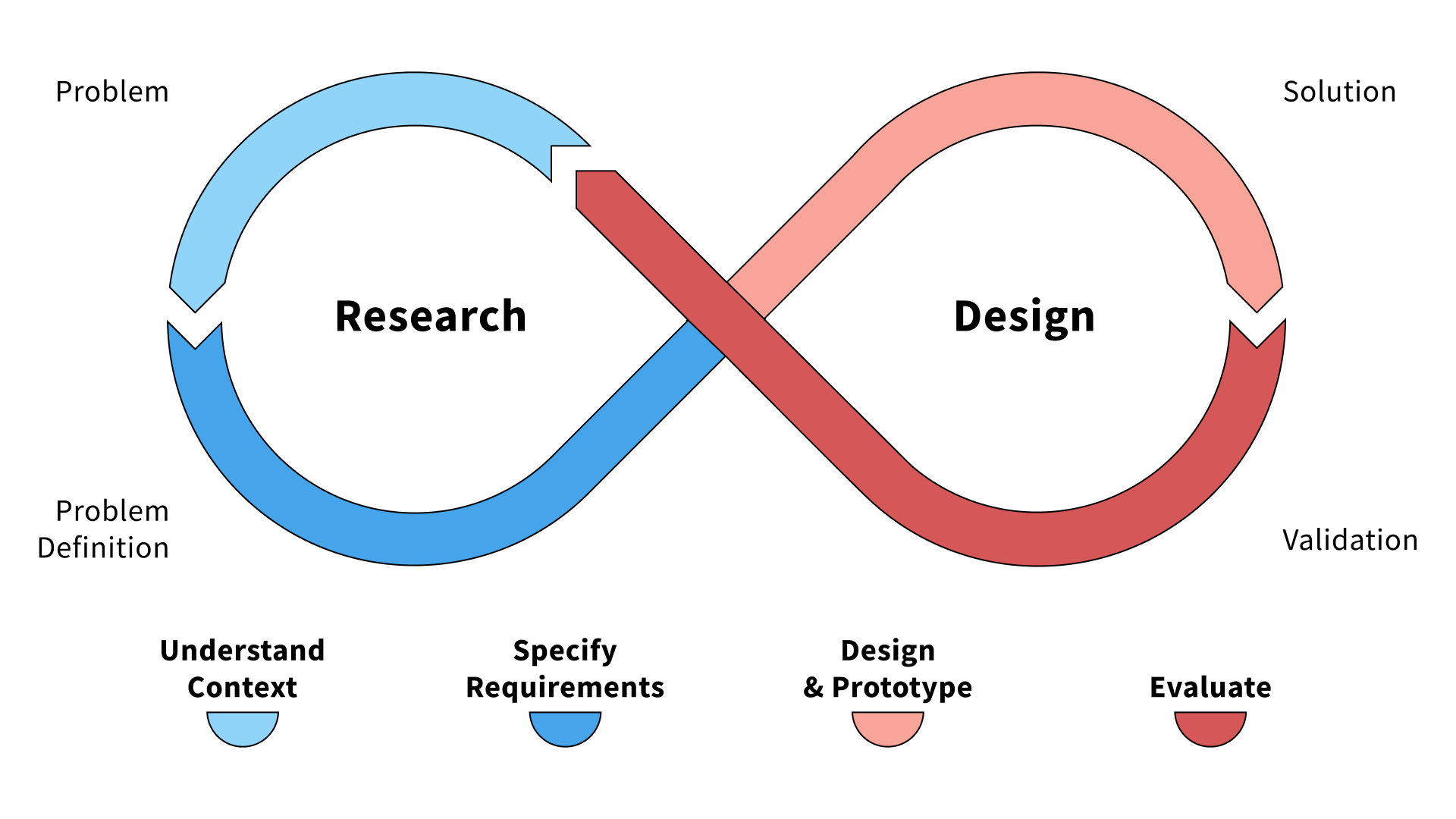
Design Thinking and User-Centred Design are often compared, but what distinguishes them is the inclusion of user needs alongside business objectives in UCD.
Lean UX
Lean UX is a collaborative, fast-paced design approach based on Agile principles that focuses on iterative learning, building Minimum Viable Products (MVPs), and receiving real-time feedback rather than heavy documentation.
Lean UX phases:
- Think: Brainstorm areas for improvement based on research and benchmarking. Develop a problem statement and decide which areas to improve.
- Make: Build a new feature that might solve a problem and/or improve the product.
- Check: Test the new feature to see whether customers respond well to it. If yes, it becomes part of the new design; if no, return to the Think phase and try something new.
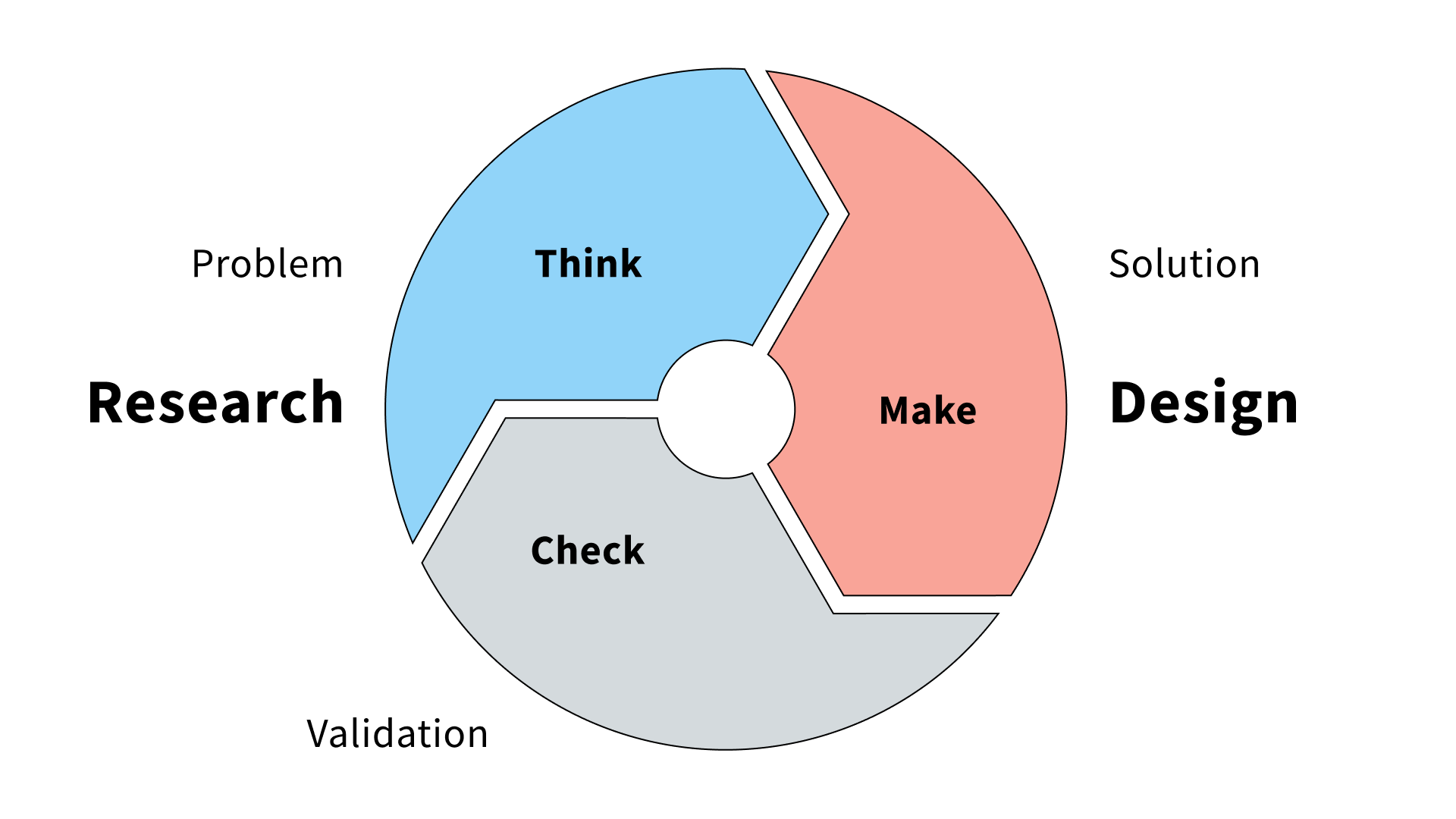
What distinguishes Lean UX is the desire to deliver a working product as quickly as possible, which will be gradually improved in subsequent development phases. The advantage of this approach is the ability to optimise costs, test the concept on the market and adapt to customer feedback on an ongoing basis.
Ultimately, the process is the same across all systems. It is worth remembering that every good product starts with research, analysis, and problem definition.
If you are interested in how the FINANTEQ team designs, you can find more information here.
What do you mean? Doesn't AI know what users want?
Artificial Intelligence has many applications in experience design where it performs well. Still, I will write about that in the second part of the article – for now, let's talk about what it cannot handle.
AI does not understand subtleties
This statement is relevant to all the other points mentioned here. Subtleties are very important in a designer's work. They allow us to deeply understand our target group, analyse the conditions in which our product will be used, and predict edge cases that lead to errors and technical problems. Artificial intelligence does not notice these small clues. For AI, there is no difference between a customer from the Polish market and a customer from the French market – a European is a European. The context of use is also irrelevant – what matters is what the application does, not the conditions in which customers use it.
There are many examples, and I will return to this subtlety because it is of great importance in the entire design process.
AI is not a researcher
Have you read about lawyers who used ChatGPT and cited fake cases, or about recent situations involving Deloitte analysts who provided AI-generated analysis? These examples show that Artificial Intelligence (AI) likes to make up reports, conjure up sources, and cite relevant (unfortunately non-existent) examples.
LLMs do not think; they predict based on the large data set they have been trained on. Part of the research stage involves gathering new information specific to our individual case, so language models may not even have matching sources in their collection.
When preparing for research, it is also better not to count on substantive help. Due to its lack of understanding of subtleties, AI will not prepare valuable, in-depth interview scenarios or question sets for quantitative surveys. It will not find reliable and specific reports, data, or statistics on the target group. It will not suggest workshops or their formats that could enrich your case with potentially relevant information.
AI does not understand complex needs
When designing experiences, we want to solve specific problems. To do this, we try to understand the user and learn about their perspective and needs. If we overlook something at this stage or fail to account for small details, our solution will not fully meet users' expectations.
Artificial intelligence does not even take these small details into account. Emotions are irrelevant to it; it does not see that the problem's cause may lie deeper and that the issue needs clarification. By defining needs this way, our product will only superficially address users' needs.
AI will not select the best solution
Have you ever tried asking GPT chat which of two relatively similar products is better, taking into account the specifications, intended use, your own needs, or even directly linking offers to the shop? And have you tried repeating the prompt several times afterwards? I recommend trying this experiment yourself; you will see that you get different answers – sometimes product A is better, sometimes product B. Each time, you will also get convincing arguments for and against.
It is time to ask the chatbot to choose the best of several similar (but still distinct) solutions for a single user path – taking into account the variables entered, of course. Each time, you will get a different recommendation. LLMs are not capable of conducting a factual, repeatable analysis; sometimes they turn left, sometimes right, but we may feel the choice is right because good arguments support it.
Summary
The summary will appear in the second part of the article, which will be published soon on the FINANTEQ blog. To make sure you don't miss it, please subscribe to our newsletter on Substack using form below.