.png)
Artificial intelligence is conquering new industries, software houses are competing to create "AI" labelled products, and tech giants are introducing new add-ons and features powered by freshly trained models, so that they don't fall behind. These changes reached the creative industry a long time ago. Despite this, UX/UI designers could sleep peacefully until July 2025. That's when Figma released Figma Make, AI tools that were supposed to revolutionise digital product design, for all users. In the meantime, the market was flooded with similar solutions.
The capabilities of artificial intelligence were quickly verified, and significant problems with creating applications using virtual designers came to light – let's take a closer look at them.
Before we begin
This is the second part of the article – feel free to read the first part here.
So many acronyms, so few answers
To make reading easier, it is worth familiarising yourself with the definitions:
UX (User Experience) – the totality of impressions, emotions and reactions that accompany the user during interaction with a product, service or website. The goal of UX design is to create useful, intuitive and functional solutions that meet the needs of the recipient, ensuring satisfaction and smooth operation.
UI (User Interface) – everything that the user sees and interacts with in an application, website or software – i.e. buttons, menus, icons, layout, colours and other visual elements that facilitate communication between humans and machines.
Introduction to interface design
Technically, everything we discussed in the previous part of the article can be implemented without using graphics programmes. Solutions can be validated with simple drawings on paper – this method is sometimes used because it saves a lot of time.
However, every product has a visual setting, and in digital products, this setting is the interface's appearance and behaviour.
Fundamental principles of UI design
When designing interfaces, there are a few fundamental principles to keep in mind:
- Intuitiveness (Ease of use): The interface should be understandable at first glance.
- Consistency: A uniform appearance, layout, colours and behaviour of elements throughout the system builds trust and facilitates learning.
- Clarity and simplicity: Avoid unnecessary features, reduce cognitive load and remove information noise.
- Visual hierarchy: The most important elements (buttons, CTAs) must be prominent and easy to find.
- Aesthetics: A visually appealing design is perceived as more useful.
These are just the basic principles – there are many others, such as Gestalt rules, interaction principles, responsiveness and accessibility in UI, but the above are the most important.
Atomic Design
The components of the interface are best described by the Atomic Design concept, which divides objects into smaller and smaller parts until we reach the simplest, indivisible ones.
Each interface is made up of basic elements/atoms (colours, fonts, icons), which are then used to create more complex molecules (buttons, text fields, sliders, menus), molecules are used to create organisms (navigation bars, forms, tabs), and organisms populate the ecosystem, i.e. our screens.
Design System
By creating in accordance with this concept, we can prepare a reusable, consistent and scalable Design System – a library of atoms, molecules and organisms of our product – which is also easy to modify and allows us to create new screens quickly.
How does it work? When preparing a design system, we use components – objects whose main pattern is stored in the library, and pasting them onto the screen creates an instance linked to that pattern. If we want to, for example, change the colour of a button from red to yellow, we make changes to the main component, and all instances of the object will automatically update their appearance.
Finally, it is worth noting that UX and UI are two sides of the same coin. Without UX, the interface would be just a beautiful façade that looks great from the street, but the building is not suitable for living in. On the other hand, without an interface, even the most well-thought-out and functional architectural design would not go beyond the skeleton phase with a foil-covered roof.
If you are interested in how the FINANTEQ team creates functional interfaces, you can find more information here.
AI is not good at UI
If UI design is so complex, how is generative AI able to create useful solutions that take into account the principles of interface design and the functional specifications developed during the UX creation stage?
AI does not understand subtleties (again)
Every product is different – even if the differences are not visible at first glance. The two giants of the passenger transport market, Uber and Bolt, which seemingly offer the same service to the same customers under a similar business model, have applications that look and work differently. Sure, the main features are similar (searching and ordering rides, user profile, tracking the driver's route), but the way they display information to the user and guide them through the basic processes is unique.
These differences result from the process of researching needs and defining problems. AI does not do this, so it does not know, for example, that business customers have completely different expectations and needs than private customers. Below is a short experiment, screens generated using the first draft tool in Figma. Prompts used, from left:
‘Create an app for taxi services, where users can order rides, see availability on the map and compare prices. The app will be available in the biggest cities (population >100,000).’
‘Create an app for taxi services, where users can order rides, see availability on the map and compare prices. The app will be available in the biggest cities (population >100,000) and will be focused on the premium client segment.’
‘Create an app for taxi services, where users can order rides, see availability on the map and compare prices. The app will be available in the largest cities (population >100,000) and will be focused on business clients.’
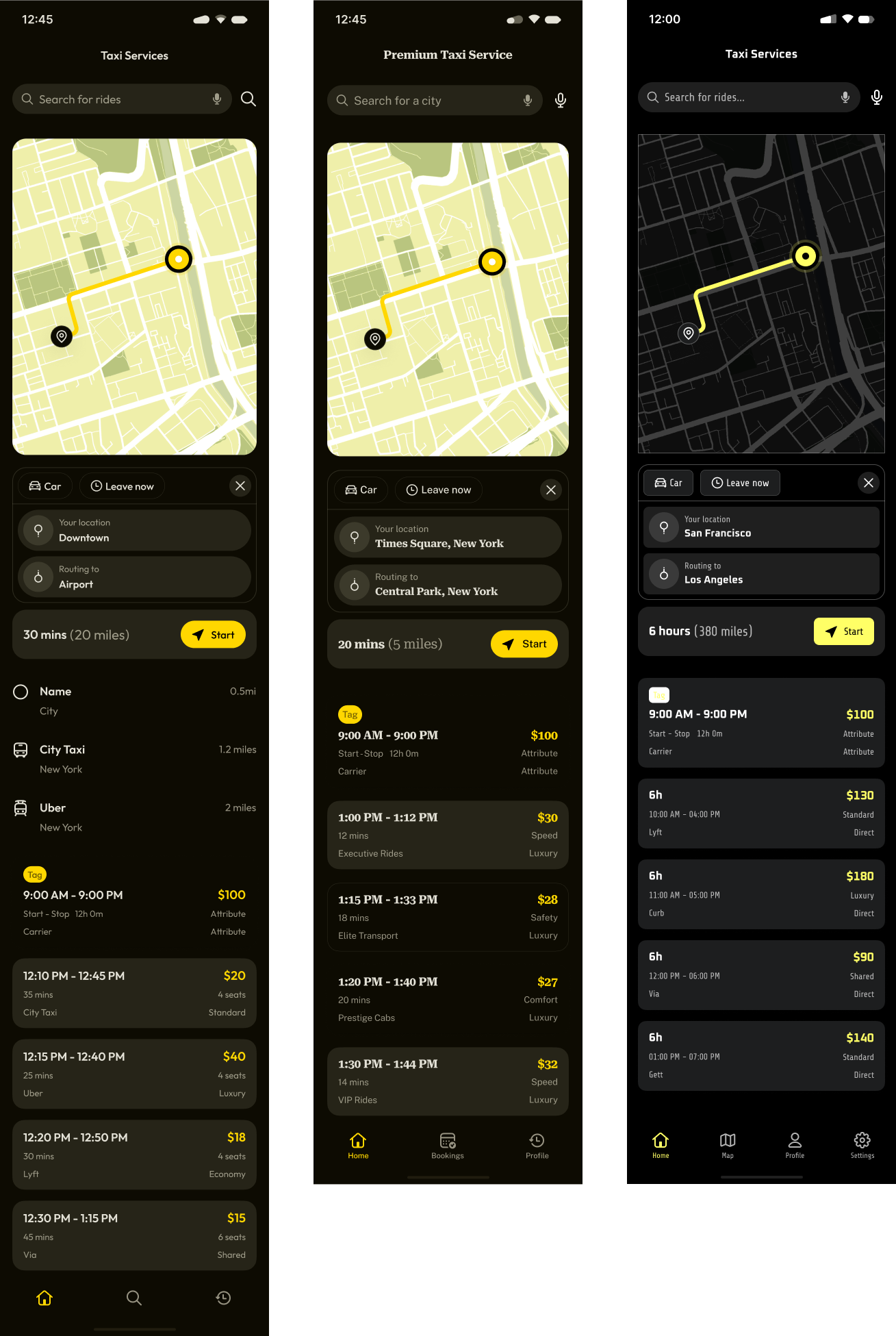
As you can see, the differences are insignificant, which will have a significant impact on business results and reaching the desired target group. In addition to this obvious problem, another arises: what if we come up with an idea similar to our competitors' and decide to use the same AI tools for design? Won't the developed products be almost identical? What about competitiveness? Who is right in a legal dispute over visual identity? Isn't artificial intelligence, which, according to suppliers, is supposed to support innovation, a hindrance in such a situation? If we are serious about developing digital products, it is worth analysing the potential effects of using AI tools first.
AI cannot make changes iteratively
This is partly due to their inability to understand subtleties and partly to the way LLMs operate. Have you ever seen videos in which ChatGPT is given the command ‘generate a photo from the attachment X times without making any changes’? It may do well at first, but after 10 or 15 generations, we end up with a completely different photo.
Today's artificial intelligence does not think; it only predicts. To predict changes to a screen, it must analyse it in its entirety and regenerate it, so there is always a chance it will introduce additional changes beyond those we requested. Worse still, we will not receive any information that an undesirable change has occurred somewhere, so it is easy to overlook.
AI generates a screen, not a process
Following the design systems discussed at the beginning, we start by describing the process – the path the user follows to reach their goal – and then we add an interface and choose the best solution.
AI would do a great job at the interface creation stage. Unfortunately, reality quickly proves otherwise. Most tools allow generating one screen at a time, and if we want to complete the entire process from A to Z this way, we would have better luck playing Eurojackpot. Even with very precise prompts, we cannot precisely control what will appear on the generated screen. Again, a short experiment in Figma. Prompts from the left:
‘Make a welcome screen for a taxi app, which will contain only a welcome message, a login button and an account registration button. Do not add any other elements.’
‘Make a taxi app login screen with a login form. It should contain only the email input field, password input field, forgot your password link text and register account link text. Do not add any other elements.’
'Make a taxi app login screen with a login form in the error state. It should contain only the email input field in error state, password input field in error state, forgot your password link text and register account link text. Do not add any other elements.'

Even with a basic process like logging in, we have problems with the precise execution of commands. Additional images, buttons, and the lack of state implementation for input fields – these are elementary mistakes.
AI will not create a system design
There are currently no tools that are capable of correctly generating a simple component library. What good is it to have twenty screens in 10 minutes if the appearance of the elements is inconsistent? Additionally, when prompting the next day, we will not know whether the style will have even more differences.
AI does not understand proper design practices
As I mentioned, artificial intelligence creates what we ask it to based on the data it was trained on. If it applies Gestalt principles or matches certain elements in terms of accessibility, it is only because it had valuable input data. LLMs do not understand these principles; they do not apply them consciously, so whether they are implemented correctly is a matter of a momentary choice to take a better path during generation.
AI will not create a responsive design
When designing for different platforms, you need to consider how individual elements and their layout will change on different screen sizes without losing functionality.
Artificial intelligence cannot do this; it will omit something, change something, fail to adapt something to a given format, and the design will look unnatural. Below is an example of an earlier prompt with the generation of a ride-hailing app, only now I asked for a website with the same functionalities:
‘Create a website for taxi services, where users can order rides, see availability on the map and compare prices. The app will be available in the largest cities (population >100,000).’

Is artificial intelligence useless?
After reading this, one might think that all these chat GPTs, Copilots, Perplexities, Claudes, and similar chat tools have no use in the design process. We know the limitations of AI and the main functional problems that do not align well with designers' needs. Are there any areas where AI works well?
Of course, there are a few:
- Quickly creating a large number of screens in different styles – this allows you to narrow down the visual character of the product and quickly validate it with the decision-making group.
- Organising research findings and brainstorming – Miro's AI tools are great at grouping by keywords or common themes.
- Transcription of in-depth interviews – AI can do this quickly and accurately, but you need to verify the document for subtle comments.
- Generating placeholders – instead of pasting lorem ipsum and thematically mismatched photos everywhere, you can use AI and add some realism to your application.
Remember that when using artificial intelligence solutions, you always need to verify what you get.
Summary
UX/UI designers can still sleep peacefully (provided that the company takes the creation and development of digital products seriously). Perhaps in the near future, artificial intelligence will be able to conduct research from A to Z, define needs, design user paths and interfaces, and finally code and make them available in the Apple and Google app stores – it would just have to stop reasoning and start thinking.