Digital accessibility is becoming an increasingly important part of designing websites, applications, online stores, and IT systems. Users access the internet in different ways, using different devices and assistive technologies. Therefore, designing accessible digital products requires taking the needs of people with disabilities into account from the planning and design stages.
One of the most important standards in this area is WCAG (Web Content Accessibility Guidelines), which provides guidelines for web content accessibility. Familiarity with WCAG helps create solutions that can be used by the widest possible range of users.
What does WCAG implementation look like in practice? How can you check whether a website complies with WCAG, and what errors occur most frequently? In this guide, we explain the most important principles and provide practical tips for implementing WCAG.
What is WCAG?
WCAG (Web Content Accessibility Guidelines) is a set of international guidelines for the accessibility of web content. The standard is developed by the W3C (World Wide Web Consortium) as part of the Web Accessibility Initiative (WAI).
The goal of WCAG is to define principles that help create websites, applications, and digital content that are accessible to people with different types of disabilities, including visual, auditory, motor, and cognitive impairments.
The current standard (as of September 11, 2026) is WCAG 2.2. The document contains success criteria that can be used to assess the accessibility of a specific digital solution. The guidelines cover, among other things, how content is presented, keyboard accessibility, document structure, forms, multimedia, and messages presented to users.
WCAG is used at many stages of digital product development. Its principles can be applied by:
- UX and UI designers,
- frontend and backend developers,
- software testers,
- SEO specialists,
- content editors,
- website and application owners,
- teams responsible for maintaining and developing websites.
It is worth remembering that accessibility applies to the entire user experience. Simply improving the HTML code will not ensure compliance if the website contains inaccessible forms, incorrectly described graphics, or videos without captions.
What Does WCAG Compliance Mean?
WCAG compliance means meeting specific success criteria assigned to a given level of conformance. Each criterion describes a specific aspect of accessibility and can be tested.
For example, a website should allow users to access its essential functions using a keyboard. Interactive elements should have an appropriately defined name and function, while informative images should have alternative text.
Conformance assessment covers both the technical layer and the way the website is used. In practice, this means checking, among other things:
- HTML structure,
- headings and landmarks,
- color contrast,
- focus visibility,
- keyboard accessibility,
- forms and error messages,
- interactive elements,
- alternative text,
- multimedia,
- content zoom,
- website behavior across different devices.
It is also important to specify which version of WCAG the declared conformance refers to and which level of conformance has been achieved. Project documentation should clearly indicate which criteria have been verified and how accessibility testing was conducted.
Automated tools can help detect some problems, but they cannot independently confirm full WCAG conformance. Manual testing, code analysis, and testing with assistive technologies are also required.
WCAG Conformance Levels
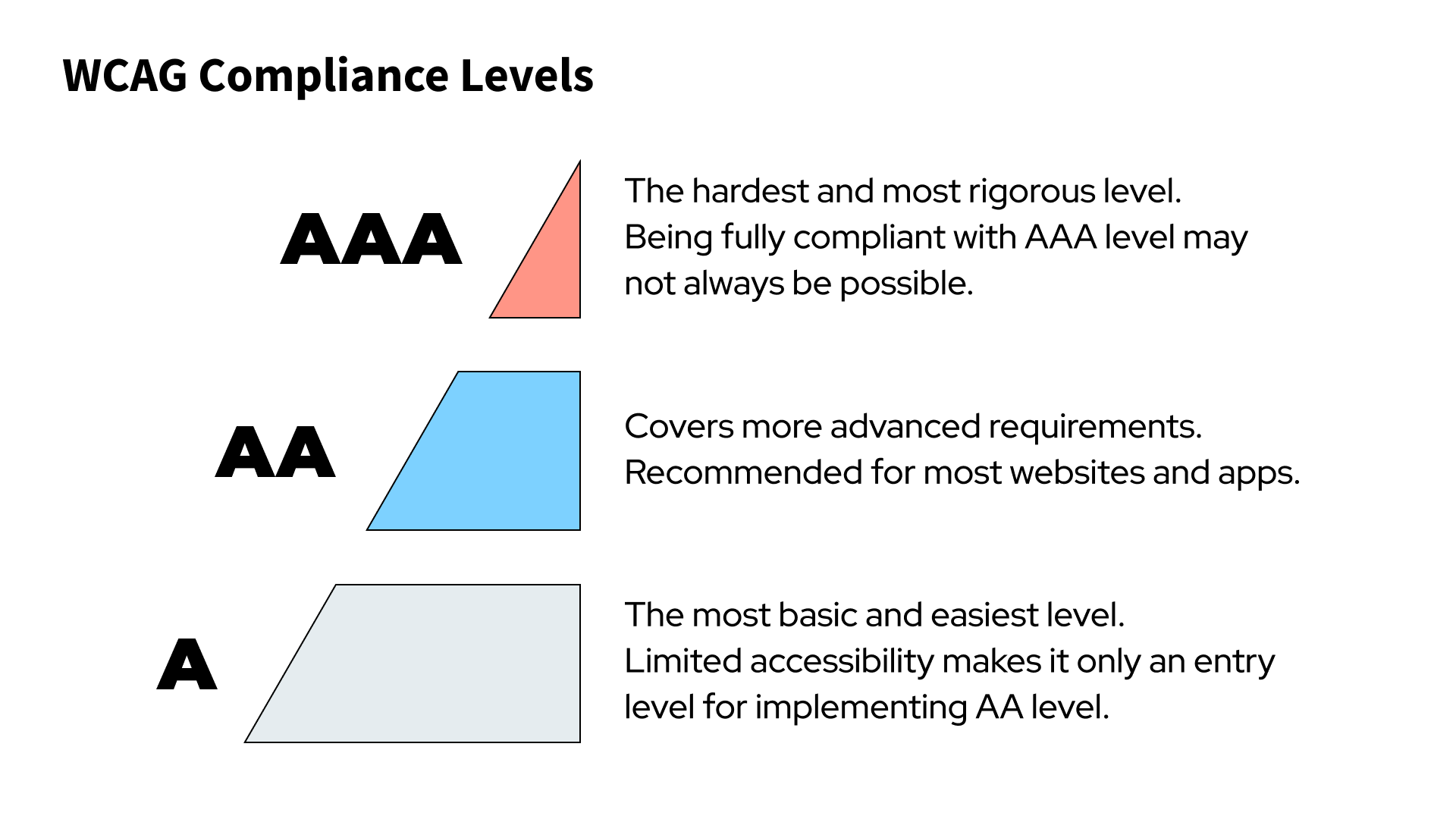
WCAG defines three levels of conformance:
Level A covers basic accessibility requirements. Failure to meet criteria at this level may prevent some users from accessing the content or functionality of a website.
Level AA covers more advanced requirements. It is the most commonly adopted target when designing professional websites and applications. It covers areas including contrast, interface accessibility, element visibility, forms, and content presentation.
Level AAA covers the most stringent accessibility requirements. Achieving this level across an entire website can be difficult because not all AAA criteria can be applied to every type of content.
In practice, it is worth aiming for at least WCAG 2.2 AA unless legal or project requirements specify a different standard. Level AA provides a reasonable benchmark for most commercial websites and digital products.
When planning a project, it is worth defining the required level of conformance at the beginning of the work. This makes it possible to incorporate WCAG into functional requirements, interface design, the development process, and testing.
The Four Principles of WCAG
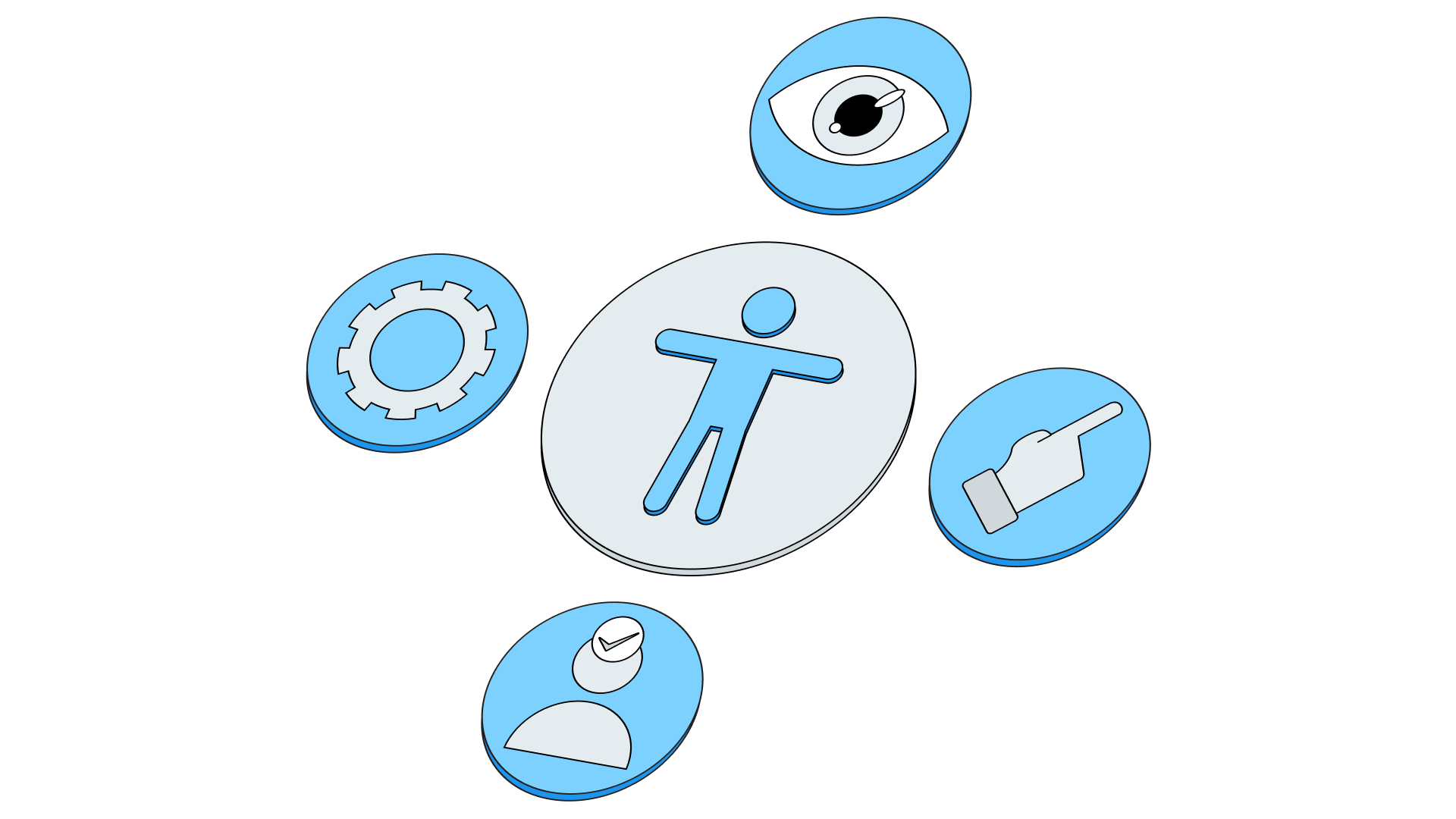
WCAG is based on four fundamental principles. They form the foundation of digital accessibility and are represented by the acronym POUR:
Perceivable
Information and user interface elements should be presented in a way that allows users to perceive them.
In practice, this includes using alternative text for important graphics, captions for video content, appropriate contrast, and a proper content structure.
An example would be a form in which every field has a clearly defined label. A user relying on a screen reader should know what each field is for and what information should be entered into it.
Operable
The interface should be operable by the user, including without the use of a mouse.
One of the fundamental requirements is keyboard accessibility. Users should be able to move between interactive elements, open menus, complete forms, and perform essential actions without having to use a mouse cursor.
Proper keyboard focus handling is also important. Users must be able to see which element is currently active.
Understandable
Content and the way the interface operates should be predictable and understandable.
This includes the language of the website, form field labels, instructions, error messages, and the behavior of interactive elements.
A good practice is to use clear and unambiguous messages. If a user makes a mistake while completing a form, they should be informed which field needs to be corrected and what they need to do.
Robust
Content should be interpretable by different browsers and assistive technologies, including as technology evolves.
In this area, a properly structured HTML document, appropriate use of semantic elements, and correct implementation of interactive components are particularly important.
ARIA can be useful for custom components, but it should be used deliberately. In many situations, the appropriate HTML element provides better accessibility than creating a similar component using only generic elements and additional ARIA attributes.
How to Ensure WCAG Compliance?
WCAG implementation is best treated as a process covering the entire lifecycle of a digital product. Fixing problems only after development has been completed is usually more time-consuming and costly.
Start with an analysis
The first step should be an accessibility audit of an existing website or application, if one exists. The analysis makes it possible to determine which areas require the most attention.
An audit may include code analysis, automated testing, manual testing, and checking how the website works with assistive technologies.
It is worth creating a list of identified issues and assigning priorities to them. Errors that prevent users from performing essential functions should be treated as particularly important.
Consider WCAG at the design stage
Accessibility should be considered as early as the creation of wireframes and visual designs.
At this stage, you can verify, among other things:
- text and interface element contrast,
- the size of clickable elements,
- heading hierarchy,
- how messages are presented,
- focus visibility,
- how components behave when content is zoomed,
- form readability.
This makes it possible to eliminate many problems before development even begins.
Use semantic HTML
A properly structured HTML document is one of the foundations of accessibility.
It is worth using elements according to their intended purpose, such as button, nav, main, header, footer, form, and appropriate heading levels.
Semantic HTML helps assistive technologies understand the structure of a website and how its individual elements work.
Take care with forms
Forms are one of the areas where accessibility problems frequently occur.
Every field should have a properly associated label. Error messages should be clear and indicate how the data can be corrected. Properly identifying required fields is also important.
A good practice is to design forms so that users know what is expected of them before submitting their data.
Test keyboard accessibility
One of the simplest ways to identify accessibility problems is to navigate through the entire website without using a mouse.
You should check whether all interactive elements can be reached, whether the focus order is logical, and whether any component prevents the user from proceeding.
Particular attention should be paid to menus, modal dialogs, dropdown lists, forms, and dynamic elements.
Use automated testing
Automated tools can detect many common problems, such as missing alternative text, certain contrast issues, and errors in the structure of a website.
However, automated validation should be only one part of the testing process. It does not replace manual testing because some WCAG criteria require an assessment of context and the actual way an interface is used.
Test with assistive technologies
It is worth testing the website using screen readers and other assistive technologies. This helps identify problems that are not visible during standard browser use.
Testing should cover the most important user journeys, such as product searches, purchases, registration, login, and submitting a contact form.
Integrate accessibility into the QA process
WCAG should be incorporated into the quality assurance process. The team can prepare an accessibility checklist and use it when testing subsequent versions of the product.
It is also a good idea to automatically check selected criteria as part of the CI/CD process. This makes it possible to detect some regressions before changes are deployed to production.
Common Errors in Implementing WCAG-Compliant Products
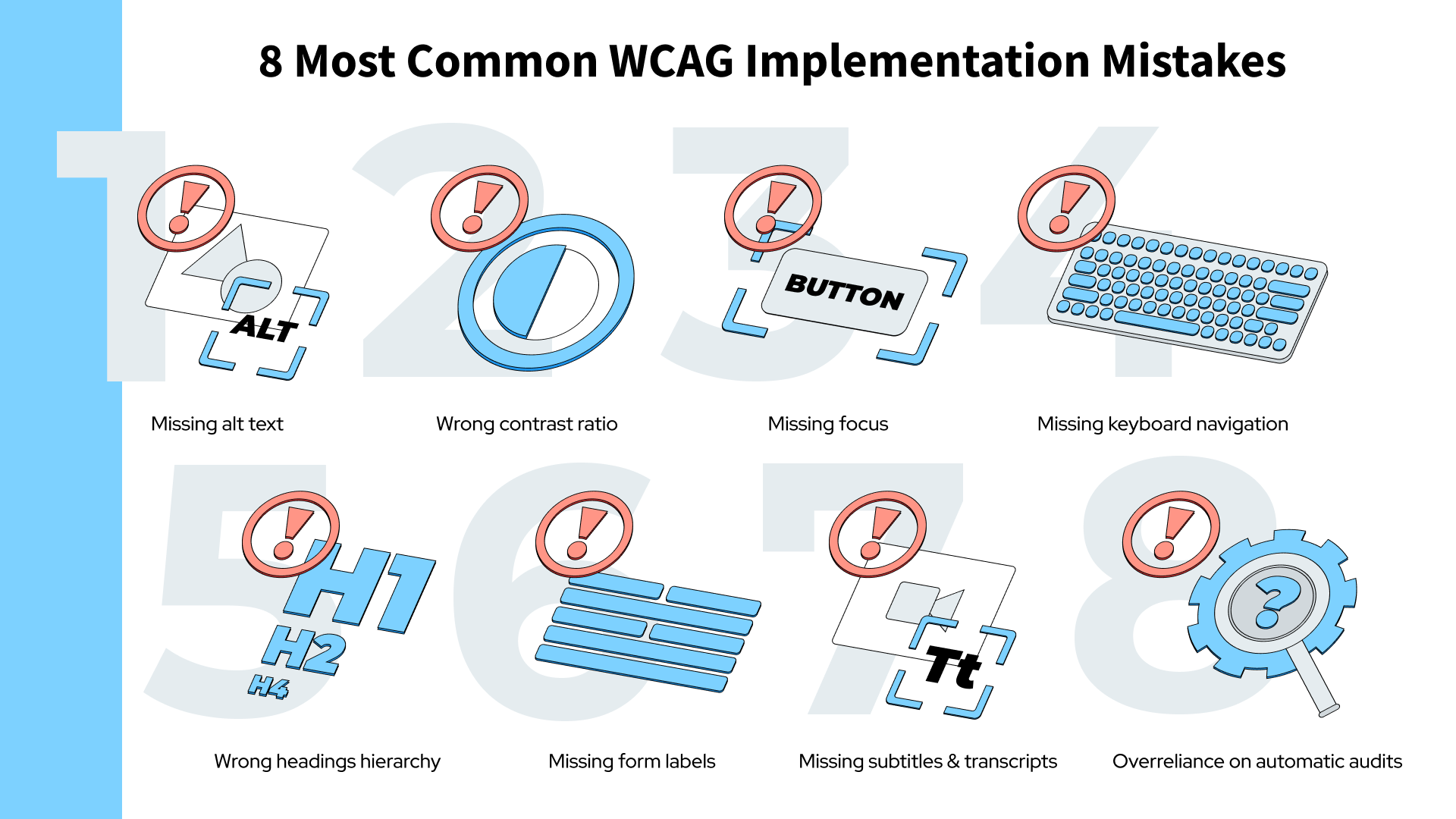
Implementing WCAG often results in problems caused by overlooking basic accessibility principles. Many of these issues can be relatively easily eliminated if they are identified at an appropriately early stage.
Missing alternative text
Informative images should have appropriate alternative text. This allows a person using a screen reader to understand the meaning of the image.
At the same time, decorative images should not be described in a way that adds unnecessary information to the content read aloud by a screen reader.
Insufficient contrast
Insufficient contrast between text and its background makes content harder to read. The issue is particularly important for people with visual impairments, but improving contrast also increases readability for other users.
Contrast should be checked not only for body text, but also for interface elements and component states, in accordance with the requirements of the relevant version of WCAG.
Lack of visible focus
Users navigating a website with a keyboard should always be able to tell where the focus currently is.
Removing the default outline without providing an alternative way to indicate the active element can make the website significantly more difficult to use.
Lack of keyboard navigation
Every essential function should also be accessible to people using a keyboard or other navigation methods.
Problems often occur in custom menus, sliders, calendars, modal dialogs, and components built from scratch by the frontend team.
Incorrect heading hierarchy
Headings help users understand the structure of a document and quickly navigate between its sections.
Heading levels should reflect the structure of the content. Simply increasing the text size with CSS does not replace a proper HTML heading structure.
Forms without appropriate labels
A placeholder should not be the only way of identifying a form field. Once the user starts entering data, they may lose the information about what the field is for.
Every field should have a clear and properly associated label.
Missing captions and transcripts
Multimedia content is also subject to accessibility requirements. Depending on the type of content, captions, audio descriptions, or transcripts may be required.
Overreliance on automated audits
The results of an automated tool should not be treated as a complete WCAG audit. Automated tools can identify specific errors, but they cannot assess all aspects of usability and accessibility.
Therefore, the testing process should combine automated scanning with manual assessment and user testing.
WCAG: Guidelines or a Requirement?
WCAG is a technical standard that defines how to create accessible digital content and interfaces. In practice, accessibility requirements may also arise from legal regulations.
In Poland and the European Union, digital accessibility is regulated, among other things, with regard to public-sector entities and certain services and products in the private sector. Relevant legislation includes the European Accessibility Act (EAA) and national legislation implementing accessibility requirements.
Therefore, before starting a project, it is worth determining which obligations apply to the specific organization, product, or service. Simply stating that a website “complies with WCAG” may be insufficient if it is not clear which version of the standard and which level of conformance have been adopted.
Digital accessibility also has a business dimension. An accessible website can be easier for all users to operate, improve the user experience, reduce barriers when accessing services, and help reach a wider audience.
Implementing WCAG – Where to Start?
Effective WCAG implementation requires cooperation across several areas: UX, UI, development, content, and QA. The best results come from considering accessibility from the beginning of a project and regularly testing subsequent versions of the product.
A practical process may look as follows:
- Define requirements – choose the WCAG version and level of conformance to be achieved.
- Conduct an audit – assess the existing website and identify the most important issues.
- Set priorities – start with errors that prevent users from accessing key functionality.
- Design an accessible interface – consider contrast, typography, focus, content structure, forms, and responsiveness.
- Implement WCAG-compliant solutions – use semantic HTML and properly designed components.
- Conduct testing – combine automated tools with manual testing, keyboard testing, and testing with assistive technologies.
- Monitor accessibility – review subsequent changes and prevent new errors from being introduced.
WCAG is best treated as a permanent part of the process of creating and maintaining a digital product. Regular accessibility testing, well-designed components, and team awareness help reduce the number of errors and make it easier to maintain compliance in future versions of a website.
Summary
Practical WCAG implementation requires looking at accessibility from several perspectives: design, technical implementation, content, and testing. The most important thing is to ensure that content is perceivable, the interface is operable, information is understandable, and technical solutions are compatible with assistive technologies.
Knowledge of WCAG 2.2, an appropriate accessibility audit, manual testing, and incorporating accessibility into the design and development processes make it possible to create digital products that are more user-friendly.
Accessibility should not be treated as a one-time task performed before a website is published. The best results come from treating it as a permanent part of the process of designing, developing, testing, and improving a digital product.